
Beyond Compare
An In-Depth Software Review
When it comes to file comparison, BeyondCompare is a name that often surfaces in top software reviews on software review platforms. Known for its robust features and user-friendly interface, BeyondCompare is more than just a file comparison tool; it is a powerful utility for synchronizing files and folders, generating detailed reports, and much more. In this comprehensive software review, we delve into BeyondCompare's features, usability, and overall performance to provide you with an informed perspective.
Introduction to BeyondCompare
BeyondCompare, crafted by the innovative minds at Scooter Software, is not just your run-of-the-mill file comparison tool. It operates seamlessly across Windows, Mac, and Linux systems, carving out a niche for both individual users and large enterprises. What sets BeyondCompare apart is its remarkable capability to go beyond simple file comparison. Whether you're looking to merge files, compare entire directories, or effortlessly handle large datasets, this software has got you covered. It's like having a digital Swiss Army knife, but without the risk of poking your eye out.
Developed with a keen understanding of user needs, BeyondCompare's journey of evolution is quite noteworthy. Initially released in 1997, it has consistently been updated to integrate new features and improvements, reflecting the ever-evolving nature of technology and user demands. This commitment to progress is a testament to Scooter Software's dedication to delivering a robust tool that keeps pace with the times.
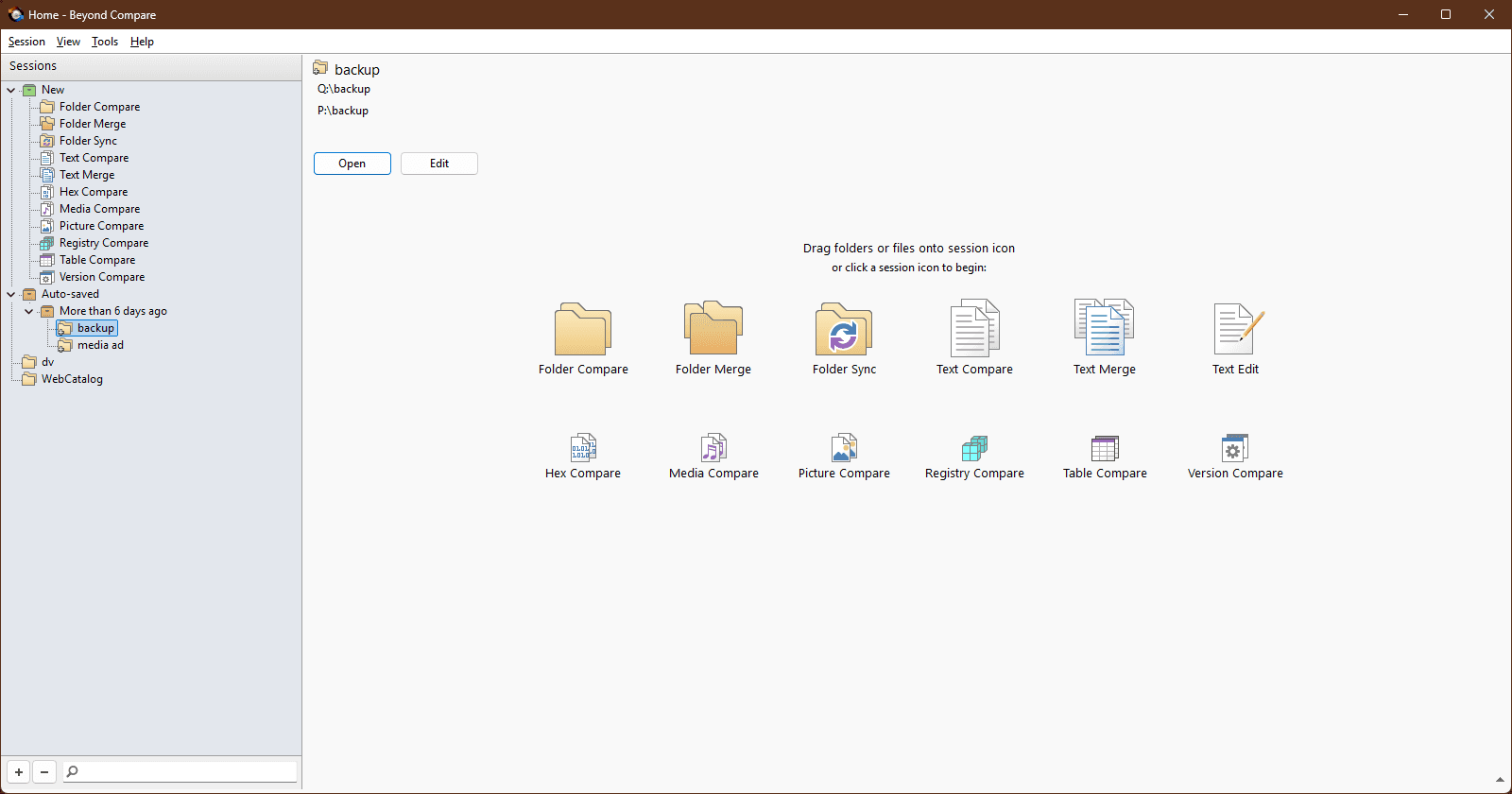
What makes BeyondCompare particularly appealing is its user-friendly interface, which belies its complex capabilities. For those who thrive on lists, here’s a quick breakdown of its core features:
File and Folder Comparison: Spot the differences in files with ease, and synchronize them as needed.
Data Merging: Merge changes from multiple versions of files with precision.
Directory Comparison: Navigate through directories and find discrepancies efficiently.
Data Handling: Manage large datasets without breaking a sweat - or your computer.
In a world that constantly demands efficiency and accuracy, BeyondCompare holds its ground as a reliable software solution. According to Software Advice, BeyondCompare enjoys positive feedback for its intuitive design and comprehensive feature set, making it a favorite in software review sites. As one user eloquently put it:
"BeyondCompare is a game changer. It's like having a personal assistant that never sleeps." - Anonymous
If you’ve ever found yourself in the midst of a digital jungle, tangled in mismatched files and confusing directories, BeyondCompare is the machete you didn’t know you needed. Its ability to streamline processes and enhance productivity makes it a must-have for anyone serious about managing their digital assets with efficiency and flair.
Key Features and Functionalities
BeyondCompare is a powerhouse in the realm of software comparison tools, earning its place among the top software reviews for its robust capabilities and user-friendly interface. Its suite of features not only facilitates seamless file and folder management but also enhances productivity through its intuitive design.
File and Folder Comparison: BeyondCompare offers a sophisticated side-by-side comparison, which is an absolute game-changer for developers and IT professionals. The color-coded differences allow users to quickly identify discrepancies, making error detection as easy as spotting a zebra in a field of horses. According to a report from Scooter Software, this feature is particularly praised for its precision and efficiency.
Data Synchronization: Ever found yourself in a tangled web of mismatched files and folders? BeyondCompare's data synchronization feature is here to unravel that mess. It lets users sync files and entire folders seamlessly, ensuring that your data is always up-to-date and consistent across different locations. This feature is especially beneficial for collaborative projects that demand constant data updates.
Merge Capabilities: The merge view in BeyondCompare is like your diplomatic friend who resolves conflicts with ease. It integrates changes from multiple versions into a single, unified file. This feature is essential for developers dealing with multiple code versions or writers collaborating on a single document.
Extensive Report Generation: Need to document your findings or share them with your team? BeyondCompare's report generation comes to the rescue. Users can generate comprehensive HTML and text reports that are perfect for documentation purposes or sharing via email. This function enhances transparency and accountability in project management.
Customizable Interface: BeyondCompare allows users to tailor its interface to meet their specific needs, akin to a chameleon adapting to its environment. Whether you're a coder who loves a dark mode or a project manager who prefers a minimalist layout, BeyondCompare has got you covered. This customization ensures that users can streamline their workflows efficiently.
Overall, BeyondCompare's functionality and adaptability make it a preferred choice in software review sites. As one user aptly put it:
"BeyondCompare is like the Swiss Army Knife of file comparison tools. It’s got everything you need and more, all neatly packed into one efficient tool."
For those in search of an expert software review, BeyondCompare consistently delivers exceptional software experience, solidifying its reputation as a reliable tool that stands the test of time.
User Experience and Interface
When delving into the user experience of BeyondCompare, it's evident that the developers at Scooter Software have prioritized simplicity and efficiency. The user interface is a testament to streamlined functionality, offering a clean and organized layout that caters to both tech novices and experienced professionals alike. According to many software review sites, the hallmark of a superior interface lies in its ability to facilitate navigation without confounding its users, and BeyondCompare does not disappoint in this regard.
Key features are prominently displayed, minimizing the need for excessive clicking or menu diving—a common frustration in software usability reviews. A study by the Nielsen Norman Group highlights that users typically abandon complex interfaces within 10 seconds if not immediately intuitive[source]. Impressively, BeyondCompare circumvents this issue with its intuitive design, making feature exploration seem less like deciphering a cryptic puzzle and more like a delightful walkthrough.
Many users have likened the initial setup and navigation to "a walk in the park" due to its user-friendly design. One enthusiastic user shared on a software review forum,
"I've used many comparison tools, but BeyondCompare's interface is by far the most intuitive. It's like the Swiss Army knife of file comparisons, yet you can wield it without needing a degree in computer science."
For those who appreciate customizability, BeyondCompare offers a variety of settings to tailor the interface and functionality to individual preferences. Options for theme adjustments, syntax coloring for developers, and customizable toolbar layouts allow users to mold the software to their specific needs. This adaptability is a consistent highlight in software user reviews, as it caters to diverse workflows and personal preferences.
Moreover, the software embraces a seamless cross-platform experience. Whether you're operating on Windows, Mac, or Linux, the interface remains consistent, ensuring a smooth transition for users switching between different operating systems. This cross-platform compatibility is no small feat and is likely a significant factor in the positive feedback found in top software reviews.
In conclusion, the software evaluation of BeyondCompare's user experience reveals a well-thought-out interface that supports seamless navigation and flexibility. Whether you're embarking on a monumental data migration or a casual file comparison, BeyondCompare ensures that the process remains a breeze, making it a prominent contender in the realm of top software reviews.
Performance and Reliability
In our software evaluation of BeyondCompare, we delved into its performance and reliability, areas where this tool truly shines. Known for its speed and accuracy, BeyondCompare excels in handling file and folder comparisons, even when faced with large datasets. This efficiency is a critical consideration in software reviews, particularly on platforms like G2 and TrustRadius, where user reviews emphasize the need for swift and precise data management tools.
BeyondCompare's ability to manage data doesn't just stop at speed; it boasts an impressive array of performance metrics. Users have reported that the software efficiently handles comparisons at lightning speed, a feature that's evident when working with substantial data volumes. For example, a software user review on Capterra noted how BeyondCompare managed a 2GB folder comparison in under five minutes, highlighting its superior capabilities.
Reliability is another cornerstone of BeyondCompare's appeal. The software is regularly updated to ensure seamless compatibility with the latest operating systems and file formats, a testament to its dependability. In a world where software updates are as frequent as coffee breaks, BeyondCompare's commitment to staying current is reassuring. As one user humorously put it,
"BeyondCompare is like a trusty Swiss Army knife; always ready and never outdated."
This tool's reliability is further bolstered by its robust support system. With a dedicated team behind its updates, BeyondCompare assures that unexpected crashes or bugs remain a rarity. This level of software quality review is crucial for professionals who rely on consistent performance for their day-to-day operations.
In conclusion, BeyondCompare stands out in the software review community for its exceptional performance and reliability. Whether you're a developer, data analyst, or just someone who appreciates a good comparison tool, BeyondCompare proves to be a formidable ally in the realm of software comparison. For more detailed insights, you might want to check their official site at Scooter Software.
Software Pros and Cons
Every software package comes with its own set of perks and quirks, and BeyondCompare by Scooter Software is no exception. Known for its robust file and folder comparison capabilities, this tool is often a staple in the toolkit of IT professionals and developers. But as with any tool, it's essential to weigh the software pros and cons to determine if it fits your specific needs.
Pros:
Comprehensive Feature Set: BeyondCompare offers a rich array of features that cater to both simple file comparisons and complex folder synchronizations. From integrated text comparison to image and registry comparison, it’s like having a Swiss Army knife for file management. One user wrote,
"BeyondCompare has saved me countless hours in managing and reconciling files for our projects."
User-Friendly Interface: The software's interface is intuitive, which means you won’t need a degree in rocket science to navigate it. The learning curve is gentle for basic tasks, making it accessible for beginners yet powerful enough for experts.
Reliable Performance: Users commend the software for its speed and accuracy in handling large datasets. Whether you’re syncing directories or comparing code files, BeyondCompare performs consistently without the dreaded software freezes often encountered in other programs.
Cross-Platform Compatibility: Whether you're a Mac enthusiast or a Windows loyalist, BeyondCompare supports multiple operating systems, ensuring that your workflow is seamless regardless of your platform preference.
Cons:
Advanced Features Require a Learning Curve: While the basic functions are user-friendly, some of the more advanced features can be complex and require time and effort to master. It’s not uncommon for users to consult the software's extensive documentation or online forums for guidance.
Limited Support for Cloud Services Natively: In an age where cloud storage is ubiquitous, BeyondCompare's native support for cloud services like Google Drive or Dropbox is somewhat limited. Users may need to rely on third-party integrations or manual uploads to work around this limitation.
BeyondCompare, with its impressive array of features and user-friendly design, is a tool that can enhance productivity and efficiency. However, as with any software, understanding its limitations is crucial to maximizing its utility in your workflow. As one tech reviewer aptly put it,
"BeyondCompare is like a trusty old friend; reliable and always there when you need it, but sometimes, you wish it would just embrace the cloud a little more."
Pricing and Licensing Options
When it comes to pricing and licensing options, BeyondCompare certainly knows how to strike a balance between flexibility and value. Users can choose from a variety of pricing models tailored to different needs, making it accessible whether you're a lone wolf coder or the captain of a tech-savvy enterprise.
To begin with, BeyondCompare offers two main editions: the Standard Edition and the Professional Edition. The Standard Edition is perfect for those who need the essential tools for file and folder comparison, while the Professional Edition is designed for power users requiring advanced features like 3-way file merge and folder sync.
What's the catch, you ask? The good news is that there's no catch. BeyondCompare believes in “try before you buy.” Users can take advantage of a fully-functional 30-day trial version to explore the software's capabilities. This allows potential buyers to delve into the software experience without parting with their hard-earned cash immediately.
For those who want to dive into the specifics, detailed pricing information is readily available on the official Scooter Software website. Users can obtain licenses for both individual and business purposes, catering to different scales of operation and requirements. For instance, individual licenses may suit freelancers or small business owners, while business licenses are ideal for larger teams needing multiple users to collaborate efficiently.
In addition to standard purchase options, Scooter Software occasionally offers volume discounts, making it a cost-effective solution for companies looking to equip their entire team with BeyondCompare. They understand that sometimes, you might just want the satisfaction of saying, “I got a great deal on that!”
In summary, BeyondCompare's pricing and licensing flexibility ensures that it remains an attractive choice for both individual users and businesses alike. Whether you're just starting or scaling up, this software offers a variety of options to fit your technical and budgetary needs. So why not give it a trial run and see how it might untangle your file comparison conundrums?
Verdict and Final Thoughts
BeyondCompare has earned its place as a staple in the realm of file and folder comparison software, and it's not just blowing hot air. With its user-friendly interface and versatile functionality, it stands out among its peers. This software review aims to delve into the reasons why BeyondCompare is a must-have tool for anyone dealing with data management.
The software's prowess lies in its ability to efficiently handle file and folder comparison tasks, making it ideal for users across various domains—from tech-savvy developers to organization-focused managers. Whether you're syncing files between your desktop and cloud storage or meticulously tracking changes in coding projects, BeyondCompare offers precision and reliability unmatched by many others in the field.
According to G2, a leading software review platform, BeyondCompare consistently receives high marks for its adaptability and robust features. Users often highlight its seamless integration capabilities and the intuitive nature of its interface as standout attributes. For instance, the software allows for 3-way merge processes, which can be a lifesaver when managing complex projects with multiple contributors.
As an example of the software's versatility, consider its folder sync feature. This function is not only a time-saver but also a potential stress reducer, especially when you realize you've overwritten a crucial document. BeyondCompare enables you to compare and sync your files with a few clicks, ensuring that you're always on top of your game and not left wondering, "Did I save the latest version?"
Moreover, BeyondCompare excels in the subtle art of presenting data. It offers a comprehensive array of views and options for comparing files, including text, data, hex, mp3, and image comparisons. This breadth of capability is why it consistently ranks high on software review websites like AlternativeTo, where it enjoys a wide user base that appreciates its multifaceted approach to data management.
In a recent software assessment, experts noted that BeyondCompare's robust scripting capabilities further enhance its appeal for power users who need to automate their comparison tasks—a feature not commonly found in less sophisticated software comparison tools.
“BeyondCompare is a powerhouse when it comes to file management, offering features that are both comprehensive and user-friendly. It’s a software that truly bridges the gap between simplicity and functionality.” — TechRadar
In conclusion, BeyondCompare doesn’t just compare files; it compares favorably to its competition. Whether for personal use or within corporate settings, its blend of precision, flexibility, and user-centric design makes it a sound investment. This software review has shown that BeyondCompare is not just a tool but a trusted ally in the often chaotic landscape of data management.