
WizTree The FASTEST Disk Space Analyzer
The FASTEST Disk Space Analyzer [Software] [Windows]
If you're constantly battling with cluttered hard drives and are on a quest to find the most efficient way to reclaim precious storage, you've likely come across a myriad of software review sites. Yet, finding the right disk space analyzer can be daunting. Enter Wiztree, touted as the fastest disk space analyzer on the market. In this software review, disk space analyzer enthusiasts will discover why Wiztree might just be the definitive choice for swiftly managing your storage needs.
Introduction to Disk Space Analyzers
In the digital age where our devices often bloat with data faster than a balloon at a birthday party, disk space analyzers emerge as the unsung heroes of our tech-savvy lives. These essential tools are designed to help users visualize and manage their computer storage with ease and efficiency. By offering a bird's-eye view of file sizes and locations, disk space analyzers simplify the arduous task of identifying and eliminating space-hogging files.
Imagine you're trying to find a needle in a haystack, but your disk space analyzer hands you a magnet. That's the kind of clarity these tools provide. As our appetite for digital content grows, so does the demand for efficient storage solutions. It's no wonder that software review platforms are buzzing with insights about these powerful utilities.
So, what makes a disk space analyzer a must-have tool? Let's dive into the nitty-gritty:
Visualization: Disk space analyzers provide visual representations of your storage, often in the form of pie charts or tree maps. This makes it easier to spot large files and folders at a glance.
Efficiency: By quickly identifying the culprits of wasted space, these tools enable users to make informed decisions about which files to keep or delete.
Time-Saving: No more manually sifting through folders. Disk space analyzers automate the process, saving valuable time and effort.
In a world where data is growing exponentially, disk space analyzers are not just tools but essential companions in our digital journeys. As DiskAnalyzer suggests, "Understanding your storage is the first step to mastering it."
“Understanding your storage is the first step to mastering it.”
With numerous software review sites providing in-depth analyses, comparisons, and authentic user feedback, choosing the right disk space analyzer has never been easier. Whether you're a savvy tech enthusiast or just someone trying to free up some space for more cat videos, these tools are indispensable in keeping your digital world tidy and efficient.
Why Speed Matters in Disk Space Analysis
When it comes to disk space analysis, speed isn't just a luxury—it's a necessity. In a world where time is money, a swift analysis translates to less time waiting and more time taking action based on the insights gathered. Enter Wiztree, a disk space analyzer that turns the clock in your favor by reportedly scanning hard drives at breakneck speed. But why does speed matter so much in disk space analysis? Let's dig deeper.
Firstly, consider this: say you're managing large-scale data operations or simply juggling multiple projects on your personal computer. A sluggish disk space analyzer could mean minutes, if not hours, of unproductive time—time you could have spent on creative or strategic tasks. In essence, a fast tool like Wiztree, which leverages direct access to the Master File Table (MFT) on NTFS-formatted drives, can transform how efficiently you handle data management.
Here’s some context: traditionally, disk space analyzers work by scanning every file individually, which can be akin to counting jellybeans in a jar one by one. This process is not only painstakingly slow but also a drain on system resources. In contrast, Wiztree's technique is like having a blueprint of the jar, allowing it to assess disk usage in a fraction of the time. This unique capability has propelled Wiztree to the forefront in many software review articles and forums.
For those still wondering if speed makes a real difference, think about this: a fast disk space analyzer allows IT professionals to minimize system downtime and optimize drive usage swiftly. This expedited process can be crucial in environments where disk space is at a premium and every moment counts. To quote a user from a popular software review community, "Wiztree makes scanning so fast, it's like my hard drive is sprinting!"
In conclusion, the choice is clear. When evaluating options, consider the impact of speed—not just as a feature, but as a game-changer in your software assessment process. Fast analysis means more time to focus on what truly matters: making informed decisions and maximizing productivity. After all, in the realm of disk space analysis, speed is not just about efficiency; it's about effectiveness.
Features of Wiztree
Lightning-Fast Scans: In the race of disk space analyzers, Wiztree is the Usain Bolt. By harnessing the power of direct Master File Table (MFT) access, it achieves scan speeds that leave competitors in the dust. Unlike many traditional disk analyzers that take their own sweet time, Wiztree reads the MFT directly from the disk, skipping the OS's file system routines. This approach is not only efficient but also incredibly fast. One user humorously commented on a forum, "I started a scan and before I could even blink, it was done!" Now, that's speed!
User-Friendly Interface: Life is complicated, but your disk space analyzer doesn't have to be. Wiztree prides itself on a simple, intuitive design that makes it accessible for both tech newbies and seasoned pros. With a clean layout and a no-frills approach, users can easily navigate, interpret, and manage their disk space. Remember the days when deciphering software interfaces felt like trying to understand hieroglyphics? Those days are over with Wiztree.
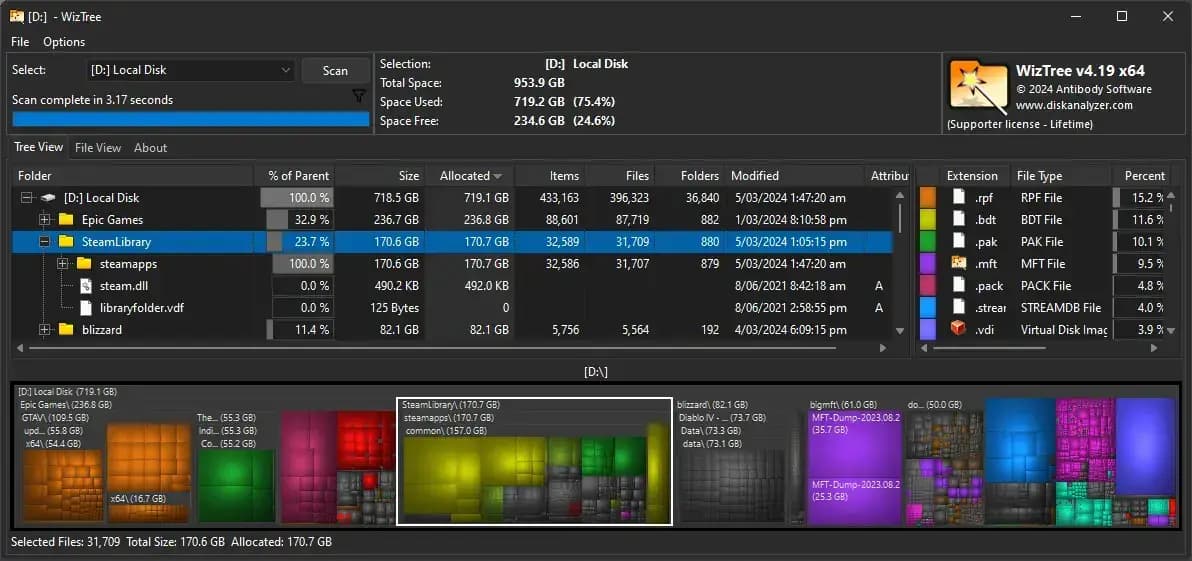
Comprehensive Visualizations: Numbers are great, but visual data representation? Even better! Wiztree offers detailed treemaps that allow users to instantly interpret data and identify space hogs. These visualizations are not just eye-catching; they are incredibly functional. Imagine trying to find a needle in a haystack without any guidance. With Wiztree's treemaps, you get a bird's eye view of your storage, making it easier to pinpoint the files and folders taking up the most space.
Support for Large Drives: In a world where data is growing exponentially, having software that can only handle small drives is like bringing a knife to a gunfight. Thankfully, Wiztree is equipped to scan even multi-terabyte drives effortlessly. Whether you're managing a massive database or just have a bewildering collection of cat videos, Wiztree handles it all with ease. According to diskanalyzer.com, Wiztree's efficiency with large drives is unparalleled, ensuring you won't have to wait an eternity to get your data insights.
Software Pros and Cons
When diving into the world of disk space analyzers, Wiztree emerges as a notable contender, offering a unique blend of advantages and a few limitations. Let's break it down, shall we?
Pros:
Unmatched Speed: Wiztree is renowned for its lightning-fast performance, particularly when scanning massive hard drives. Unlike other tools, which may take their sweet time, Wiztree completes scans in a fraction of the time. This rapid performance has been a consistent highlight in top software reviews, making it a favorite among those who value efficiency. According to Disk Analyzer, users have lauded its "blink-and-you-miss-it" speed, which leaves competitors trailing.
Ease of Use: Interface design can make or break a software experience. With Wiztree, its user-friendly interface ensures even the most tech-challenged individuals can navigate effortlessly. The straightforward design and intuitive layout eliminate any chance of getting lost in the process—like a GPS for your hard drive!
Detailed Visualization: Visual learners, rejoice! Wiztree provides detailed file size visuals, helping users quickly identify which files are hogging precious space. This feature becomes a game-changer for those looking to perform swift spring cleaning on their drives.
Cons:
Windows Exclusive: While Wiztree shines on Windows platforms, its limitation to only Windows and NTFS drives is a bummer for users operating on other systems. This OS exclusivity was pointed out in several software review forums where users expressed their longing for a Mac or Linux version.
Limited File Actions: Though Wiztree excels in showing you what's taking up space, its ability to manage those files is somewhat limited. Users looking for a one-stop-shop solution might find this limiting, as additional tools might be necessary for file management tasks.
In the realm of disk space analyzers, Wiztree is a bit like a sports car: super fast and sleek, but not the best for off-road adventures—unless your 'off-road' is outside the Windows ecosystem. As one reviewer quipped on a popular software review site, "Wiztree might not park in every garage, but boy, does it take you for a ride!"
Comparison with Other Disk Space Analyzers
When it comes to disk space analyzers, the choices can feel as overwhelming as deciding which Netflix show to binge-watch next. That's where a comprehensive software review disk space analyzer comes in handy. In the vast universe of disk space analysis tools, WizTree consistently emerges as a front-runner, particularly in comparison with popular contenders like WinDirStat and TreeSize.
Let's dive into what makes WizTree shine brightly in this galaxy of analyzers:
Speed: Known for its lightning-fast scanning capabilities, WizTree utilizes the Master File Table (MFT) concept, allowing it to identify and display files almost instantaneously. This approach is akin to having a superpower in the disk space analysis world, making traditional scanning methods appear as leisurely as a Sunday stroll.
User Interface: While WinDirStat and TreeSize boast their own user-friendly interfaces, WizTree's layout is refreshingly straightforward. The simplicity caters to both tech-savvy users and those who might still be figuring out how to change their desktop wallpaper.
Reliability: According to Disk Analyzer, WizTree's accuracy in providing a detailed breakdown of disk usage has been repeatedly highlighted in numerous best software reviews. With WizTree, you aren't left guessing where your disk space disappeared.
For the meticulous and the curious, here’s a quick software comparison:
"In terms of raw speed and efficiency, WizTree reigns supreme over other options like WinDirStat and TreeSize, making it the go-to choice for users prioritizing performance." - Disk Analyzer
So, next time you're wondering where all your disk space went faster than a tray of fresh cookies in a break room, consider giving WizTree a try. It's the equivalent of having an X-ray vision for your hard drive, without the need for a cape or a heroic moniker.
User Feedback and Ratings
Browsing through the bustling hubs of software review platforms like TrustPilot and Capterra, one can't miss the chorus of positive chatter surrounding WizTree. This disk space analyzer has carved out a niche for itself, largely due to its blazing speed and unmatched simplicity. Users often liken its performance to a sprinter in a marathon, quickly scanning and revealing even the most hidden of files—no small feat in the digital age!
According to numerous software user reviews, WizTree is not only fast but also intuitive. This winning combination earns it a favorable spot on many software ratings lists. But, like any great symphony, there are a few notes of constructive criticism. Users have pointed out areas for improvement, particularly in enhancing cross-platform functionality. While it currently runs on Windows, expanding its usability could open doors to a whole new user base.
For developers at the helm, this kind of software feedback is invaluable. It provides a roadmap for future updates and ensures that they're on the right track to delivering a top-notch product. As one reviewer aptly noted on Capterra,
"WizTree is like a well-tuned sports car—swift and efficient. But, imagine if it could also drive on any road, not just the ones with a Windows signpost!"
Such insights are pivotal for anyone involved in software development. They not only enhance user experience but also build a loyal community around the product. It's this genuine, unbiased software review that pushes boundaries and fosters innovation, reminding us that in the world of software, there's always room to grow.
Conclusion: Is Wiztree Right for You?
Wiztree stands out as an excellent choice for anyone in need of a fast and efficient disk space analyzer. In the realm of software reviews, it consistently garners attention for its extraordinary speed and straightforward interface. Though it might not offer universal compatibility across all operating systems or file structures, its core strengths lie in its usability and performance.
For those who feel bogged down by cluttered storage, Wiztree provides a simple and effective solution. It’s a tool that doesn’t complicate your life with unnecessary bells and whistles. In fact, the beauty of Wiztree is in its simplicity—what you see is what you get, and what you get is pretty darn fast. As one user put it, Wiztree is like "the Usain Bolt of disk space analyzers."
Here's why Wiztree could be the right choice for you:
Speed: Unlike many of its competitors, Wiztree scans your drives at lightning speed, making it one of the fastest disk space analyzers available.
Usability: The software is designed with user-friendly simplicity in mind, so you won’t find yourself lost in a sea of complex options.
Reliability: It delivers consistent performance, making it a favorite in many software review blogs.
However, it’s important to note that while Wiztree excels in many areas, it does have its limitations. It’s primarily developed for Windows, which means if you're a Mac user, you might need to look elsewhere. But for Windows users, whether you're a tech-savvy professional or just someone tired of seeing that dreaded "low disk space" warning, Wiztree offers a breath of fresh air.
At the end of the day, if you’re seeking a reliable and rapid disk space analyzer, Wiztree is worth considering. As highlighted in several software review articles, it has proven itself to be a valuable tool for both individuals and businesses seeking to maintain organized and clutter-free storage. In the grand scheme of software evaluations, Wiztree certainly earns its place among the top contenders.
"Wiztree is the Usain Bolt of disk space analyzers." - A Satisfied User